
Build a coin minigame
Time to put the commands together. This little game tracks coins on a live scoreboard, plays a chime each time you collect one, and declares a winner at 10 — all with a few small functions.
1. Set up the score
Create a coins objective, show it on the sidebar, reset everyone to zero, and announce the goal. Run this once to start a game.
# functions/game/setup.mcfunction
scoreboard objectives add coins dummy "Coins"
scoreboard objectives setdisplay sidebar coins
scoreboard players set @a coins 0
title @a title Collect 10 coins!
2. Collect a coin
This function awards one coin with feedback — a sound and an action-bar message — then checks whether the player has hit 10 and, if so, calls the win function. matches 10.. means "10 or more."
# functions/game/coin.mcfunction
scoreboard players add @s coins 1
playsound random.orb @s
title @s actionbar Coin collected!
execute as @s if score @s coins matches 10.. run function game/win
3. Win the game
A big title, a triumphant chime, and reset the score so they can play again.
# functions/game/win.mcfunction
title @s title You win!
playsound random.levelup @s
scoreboard players set @s coins 0
4. Trigger it
Test it by hand with /function game/coin a few times — watch the sidebar climb and the win fire at 10. To make it a real game, wire a coin pad: place gold blocks and let a tick.json award a coin when a player stands on one.
# functions/tick.mcfunction (via tick.json)
execute as @a at @s if block ~ ~-1 ~ gold_block run function game/coin
(Add a short cooldown with a tag if you don’t want it awarding every tick while they stand still.)
See it in Minecraft
Export the pack, activate it on a world with cheats, and run /function game/setup then /function game/coin. The Coins objective tracks your score live on the sidebar — and the moment you hit 10, “You win!” fills the screen.
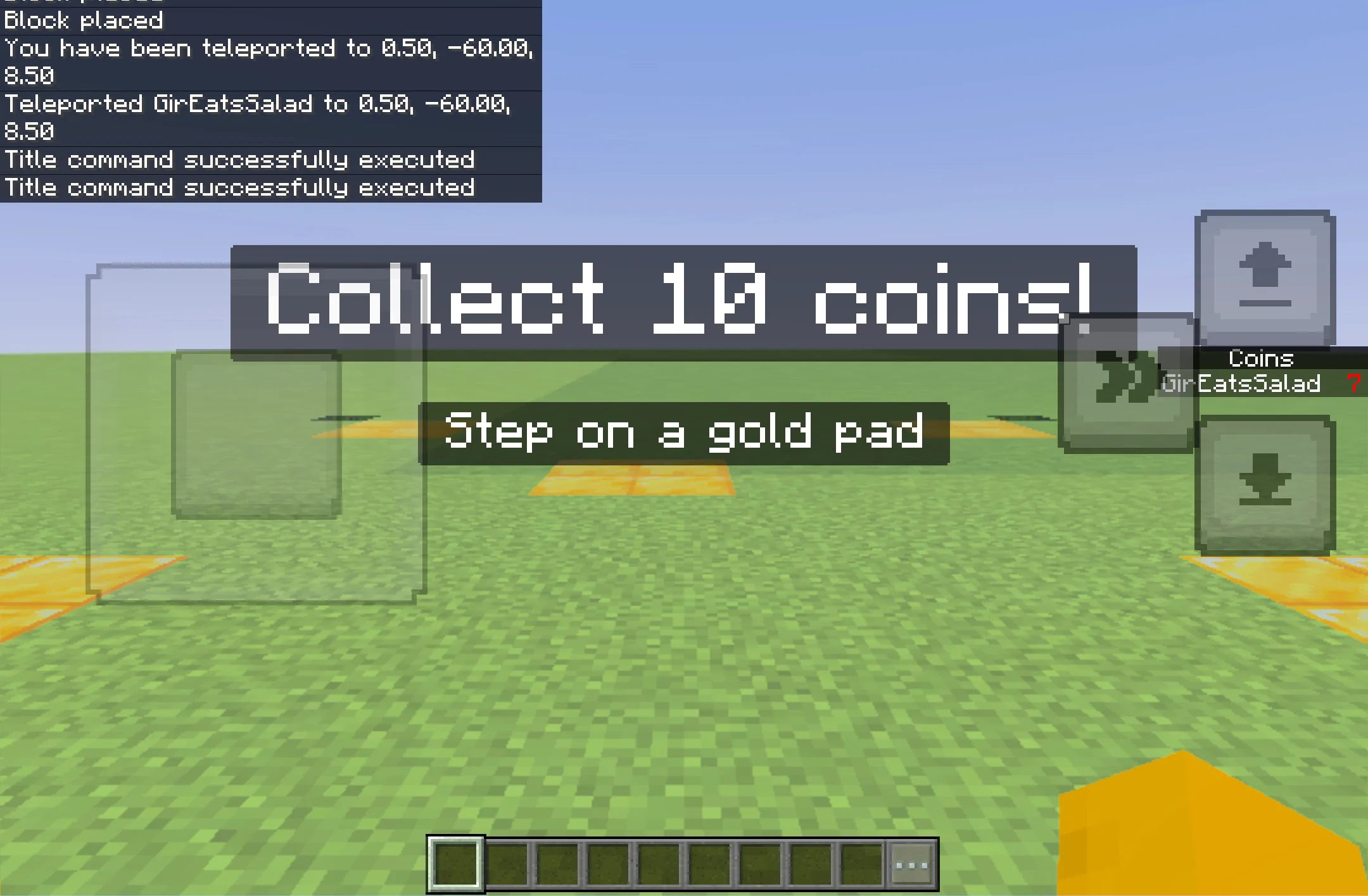
The gold coin pads in the shot are just a few fills — run this once where you're standing:
# functions/game/build.mcfunction — gold coin pads
fill ~-5 ~-1 ~-5 ~-4 ~-1 ~-4 gold_block
fill ~4 ~-1 ~-5 ~5 ~-1 ~-4 gold_block
fill ~-1 ~-1 ~-1 ~0 ~-1 ~0 gold_block
fill ~-5 ~-1 ~3 ~-4 ~-1 ~4 gold_block
fill ~4 ~-1 ~3 ~5 ~-1 ~4 gold_block
Make it yours
- · Change the goal (matches 20..) or the reward sound.
- · Give the winner an item or XP with /give or /xp.
- · Add a timer objective that counts down, for a race.
Ship it to Minecraft.
Export the pack, activate it on a world with cheats, and play.
The full round trip