
Command Bedrock Edition ~3 min read
The /replaceitem command
Put an exact item in an exact slot — armor, hotbar, or a chest — no dropping required.
What it does
/replaceitem sets a specific slot to a specific item. Unlike /give, you choose the slot — auto-equip armor, stock a fixed hotbar for a minigame kit, or fill a chest slot from a function.
Syntax
replaceitem entity <target> <slot> <slotId> <item> [amount]replaceitem block <x y z> slot.container <slotId> <item> [amount]- slot
- The slot type, e.g. slot.armor.head, slot.weapon.mainhand, slot.hotbar, slot.inventory.
- slotId
- The index within that slot type (hotbar 0–8, armor uses 0).
- item [amount]
- What to place and how many.
Examples
replaceitem entity @a slot.armor.head 0 diamond_helmetAuto-equip a helmet on everyone.
replaceitem entity @s slot.hotbar 0 diamond_swordPut a sword in the first hotbar slot.
replaceitem block ~ ~ ~-1 slot.container 0 golden_apple 5Fill a chest slot in front of you.
See it in action
Before and after running /replaceitem — in MiniBench's 3D preview and in Minecraft.
Command run
replaceitem entity @s slot.hotbar 4 diamond_block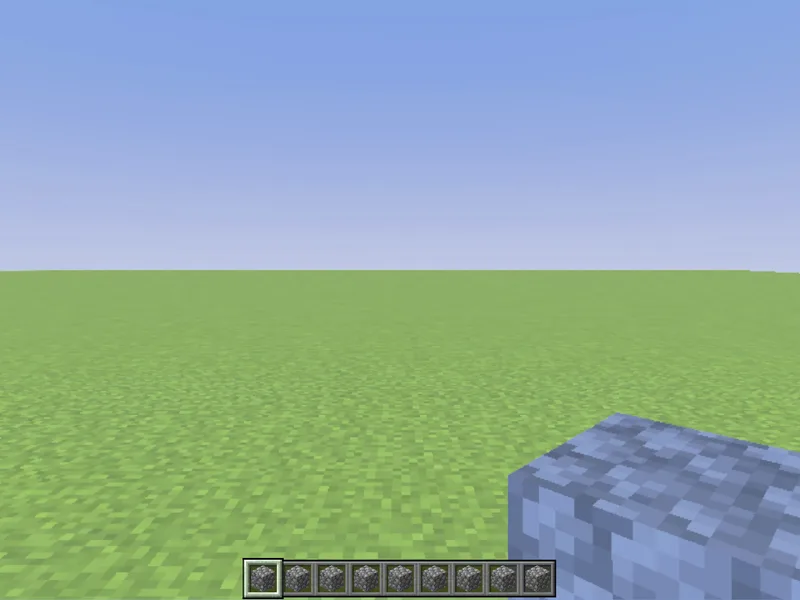
Before
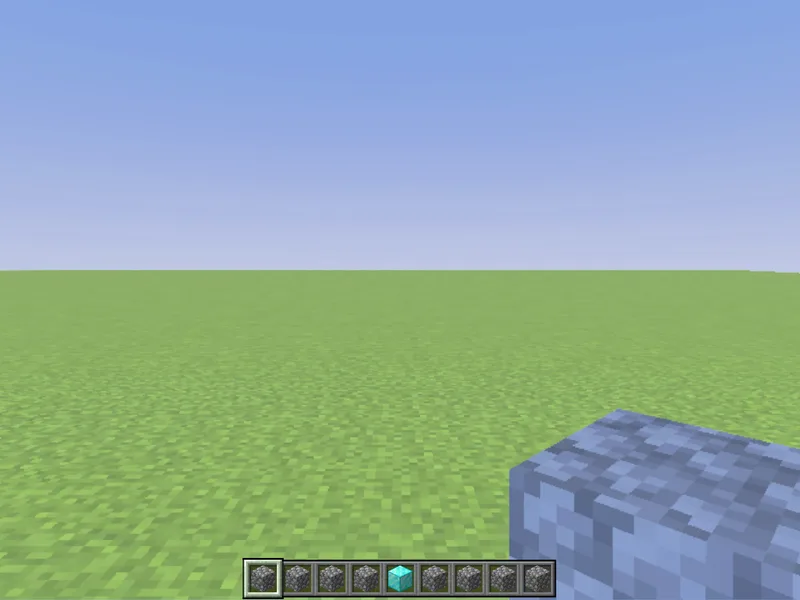
After
Not affiliated with Mojang or Microsoft. Minecraft is a trademark of Mojang Synergies AB.
Watch out for
- · slot.armor.head/chest/legs/feet all use slotId 0.
- · Newer versions also accept /item replace; replaceitem still works on Bedrock.
- · For a chest, the block must already be a container at those coordinates.
Write it in MiniBench with autocomplete and live validation, then run it in Minecraft.